
Use the Credential management task to create, modify, and delete credentials, and print badges.
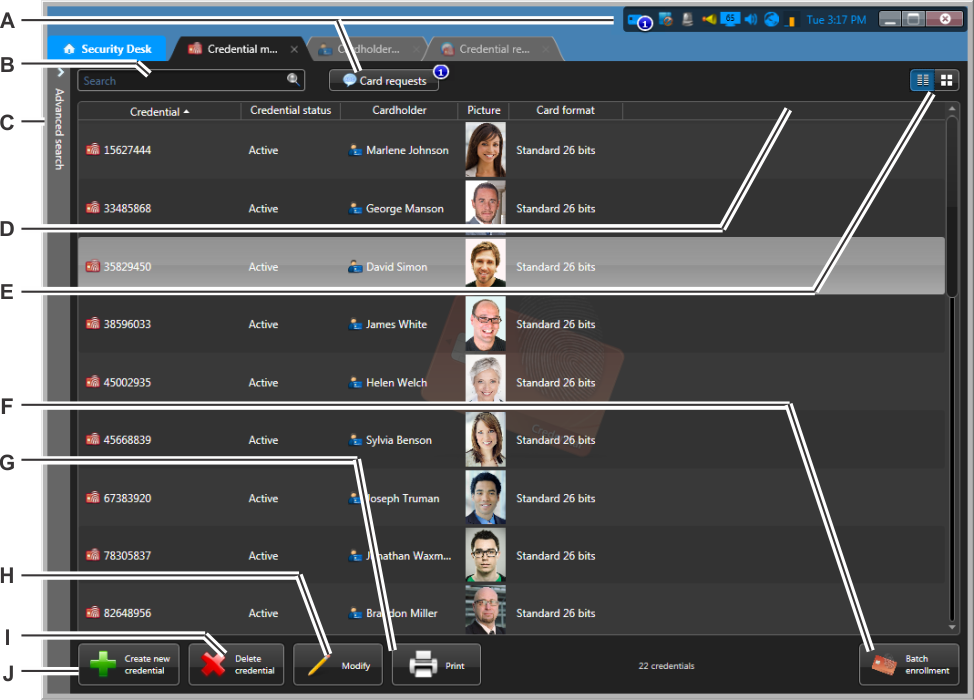
| A | View, modify, or respond to outstanding credential card requests. |
| B | Find a credential by name. |
| C | Advanced search options. |
| D | Select which columns to display by right-clicking the column headers or by typing Ctrl+Shift+C. |
| E | Switch between Tiles and
List view.
|
| F | Enroll multiple credentials into your system at once. |
| G | Print the selected credential cards. |
| H | View or modify the selected credential. |
| I | Delete the selected credentials. |
| J | Create a new credential. |
| ©2019 Genetec Inc. All rights reserved. |  |
